🗺️ Spatial Subsets#
localtileserver supports extracting spatial subsets from raster files via
bounding box crops (parts) and GeoJSON feature masks. These are useful for
downloading specific regions of interest from large rasters.
Bounding Box Crops#
Use TileClient.part() to extract a rectangular region by bounding box:
from IPython.display import Image, display
import localtileserver as lts
from localtileserver.tiler.data import get_data_path

client = lts.open(get_data_path('bahamas_rgb.tif'))

# Get the dataset bounds (south, west, north, east)
b = client.bounds()
bbox = (b[2], b[0], b[3], b[1])  # reorder to (left, bottom, right, top)

# Crop the raster to the bounding box
crop = client.part(bbox, max_size=512)
display(Image(data=crop))

GeoJSON Feature Masks#
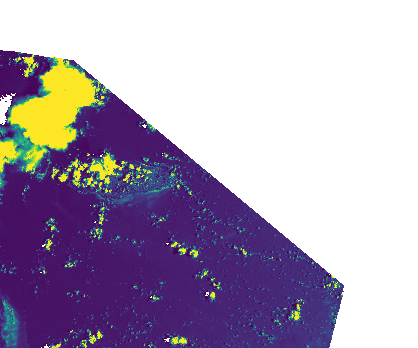
Use TileClient.feature() to extract data masked to a GeoJSON polygon.
Here we cut a diamond out of the northeast corner of the dataset:
# Diamond-shaped region of interest in the northeast quadrant
mid_lat = (b[0] + b[1]) / 2   # midpoint latitude
mid_lon = (b[2] + b[3]) / 2   # midpoint longitude
geojson = {
    "type": "Polygon",
    "coordinates": [[
        [mid_lon, b[1]],          # top center
        [b[3], mid_lat],          # right center
        [mid_lon, mid_lat],       # middle
        [mid_lon, b[1]],          # close
    ]]
}

masked = client.feature(geojson, indexes=[1], colormap='viridis')
display(Image(data=masked))
REST API#
Both operations are also available via the REST API.
Bounding box crop:
# Bounding box as left,bottom,right,top
GET /api/part.png?filename=geo.tif&bbox=-78.0,25.0,-77.0,26.0

# Specify the CRS of the bounding box coordinates
GET /api/part.png?filename=geo.tif&bbox=-78.0,25.0,-77.0,26.0&bounds_crs=EPSG:4326

# Download as GeoTIFF for GIS analysis
GET /api/part.tif?filename=geo.tif&bbox=-78.0,25.0,-77.0,26.0&bounds_crs=EPSG:4326
GeoJSON feature mask (POST with GeoJSON body):
POST /api/feature.png?filename=geo.tif
Content-Type: application/json

{
  "type": "Polygon",
  "coordinates": [[
    [-77.5, 25.5], [-77.0, 25.5], [-77.0, 26.0],
    [-77.5, 26.0], [-77.5, 25.5]
  ]]
}
Parameters#
Both part() / feature() and their REST endpoints accept:
Parameter |
Description |
|---|---|
|
Band indexes to read |
|
Band math expression to compute |
|
Colormap to apply |
|
Value range for rescaling |
|
Stretch mode to apply |
|
Maximum output dimension in pixels (default: 1024) |
|
Target CRS for the output image |
|
Output format: PNG, JPEG, WebP, GeoTIFF, NPY |
The part() method also accepts bounds_crs to specify the CRS of the
bounding box coordinates (defaults to the dataset’s native CRS).